just to share something really simple that has made a real difference in our community choir.
Many of the members do not read music, so learning complex songs with 4 parts can be very time consuming, and 3 parts often sit in sessions while the 4th part "note bashes".
This time I've recorded the different parts on the Olympus digital recorder - some sung or hummed, some playing the lines on the piano, using a new file for each - my husband did the bass lines, so a variety of voices! and with some songs we recorded a quartet of us, so the whole effect of the song could be heard!
Once uploaded on the computer each of these files can simply be burnt on to an audio cd as a new track (straight on, no need for any complicated conversion software) the tracks listed, and the resultant CD can be copied. Once the files were ready the Cd took about 20 minutes to compile.
(We sold it to members at 50p a time, with all the term's music on it, which more than covered the cost)
The result has been dramatic! No more sitting around listening to others learning their part, only polishing up and focussing on the hard bits.
The speed of learning has increased not just for the individual but for the whole group, as the song can be put together so much more quickly.
It's not for everyone, but I know several members who have played it over and over at home or on the car cd, and it really offers an alternative learning style. The gain in confidence of the "I can't singers" has been tremendous!
Showing posts with label recording learning. Show all posts
Showing posts with label recording learning. Show all posts
Wednesday, 14 October 2009

Friday, 22 May 2009
Sony Double-Take
Having had Jane C-D visit our CTLLS course to introduce us to lots of wonderful "techy" bits and pieces available to tutors around and about the county - I felt it only fair to experiment with some myself! As a techy-phobe, but a tutor on the course, it's part of my CPD to make sure I can work at least a few of them. So ... the first bit of equipment I tried out was the Sony camcorder, which allowed us to record all the micro-teaches and to immediately download them onto individuals' memory sticks for them to take home. This is the first time we've been able to offer this facility enabling candidates to effectively evaluate and reflect on their teaching in the privacy of their own homes. I had tried the whole process out at home, and although someone else did the 'filming', we managed to download all the micro-teaches onto the laptop and then the memory sticks - all within the session, so evaluation could be immediate. This is just the start, as there are suddenly all sorts of implications and uses to which this can be put. So, thank you, Jane and Kerry, who showed me how to do it all.
Wednesday, 13 May 2009
Recording reflections
One of the themes which comes up regularly is the need to record reflections. This could be after a class, when a few thoughts could be helpful for future lesson planning, after some training when some thoughts are required for a CPD record or for keeping a record throughout a programme of professional development. I don't know about you, but I struggle to corral my woolly, fluffy, mis-shapen thoughts into an online box to be filled in. I find my best thoughts and reflections are always somewhere else - sitting in the bath, doing the washing up, ironing....anywhere but when I'm sitting with that screen in front of me, trying to gather some sensible and worthwhile thoughts together.
There simply had to be a better way - and I think we've found it. Did you know that you can attach a soundclip in a Word doc? Did you know that your computer probably has an inbuilt microphone and the simple software needed to record an off-the-cuff thought without the need to do anything but a couple of clicks? I didn't. But now I've found it I want to use it all the time.
From the Start Menu, go to Accessories/Sound Recorder and a click should open a small window.

I don't think further instructions are needed, do you? Click, talk, save.
The file, when saved, goes into the "documents" folder by default, or of course, you can specify exactly where you want it to go. It's a ".wma" file and shouldn't be too difficult to find. don't forget to change the box to "all files" though, or else you won't see the .wma files listed.

When you're ready to embed it into your Word .doc (or .docx) "insert object", find and double click on the .wma file you created. A small logo will be inserted to show where to click to hear the sound clip.
Fun, eh?
(and if you're one of those lucky people with a pocket voice recorder, then it's easier still!)
Wednesday, 1 April 2009
Using Video for RARPA
This short video clip of a very flushed me (well I had just cycled 4 miles!) shows how video could be used to record learners' own goals for a course, encourage them to think about how they might achieve those goals, and how they will know when they have been achieved.
Monday, 24 November 2008
never too old!
In my Foundation English class a couple of weeks ago I recorded a group of ladies (all in their 70's) talking about their Diwali Shopping expedition to Leicester, which was obviously a fantastic day out! One of the ladies looked at the recorder and said "Oh, its an ipod, I'd love one of those!"
they've been learning past tense since then, so after some present/past matching games and practice I replayed the recording, asking them to listen for wrong (or no!) use of past tense. The looks of revelation were a picture! absolutely no coyness about either being recorded or hearing themselves, just concentrating on the job in hand.
motto: 1. you're never too old 2. give every listening task a sharp focus
they've been learning past tense since then, so after some present/past matching games and practice I replayed the recording, asking them to listen for wrong (or no!) use of past tense. The looks of revelation were a picture! absolutely no coyness about either being recorded or hearing themselves, just concentrating on the job in hand.
motto: 1. you're never too old 2. give every listening task a sharp focus
Saturday, 27 September 2008
Great photographs
Lizzie is posting some fantastic work onto the AdEd Flickr site these days. If you haven't taken a look recently, you should. Click on the link in the sidebar - it's that easy.
Thanks for sharing Lizzie - and please tell your learners how much I am enjoying their work. They are creating some wonderful art!
Thanks for sharing Lizzie - and please tell your learners how much I am enjoying their work. They are creating some wonderful art!
Wednesday, 10 September 2008
Log on, Reflect and Progress
Tutor training at the Star College this evening
Initial assessment
Summative assessment Satisfying progress captured in two photographs, don't you think?
 Satisfying progress captured in two photographs, don't you think?
Talking of photographic evidence, Hilary was thrilled to print out the photo she'd just taken with her new camera on Gill's Pogo!

Everybody wants one now...
She took a photograph of the QIA exercise about intial assessment, saving the bother of writing all those sentences down and keeping a photographic record of the activity.

A pity the internet connection went down just as we were about to blog and Reflect....but we made up with it by eating more sandwiches.
Wednesday, 3 September 2008
Evidence?
Evidence from the beginning of the session

Evidence from about half way through
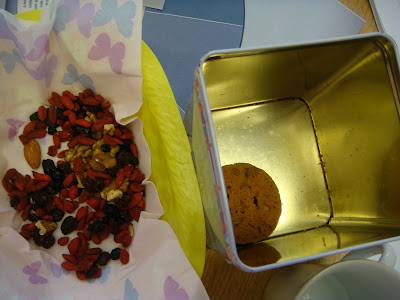
Evidence remaining at the end of the session.

To satisfy RARPA requirements, the photographs are date and time stamped and even though the quality isn't so good in photographic terms, hopefully the images are clear enough to provide an adequate level of evidence.
Evidence of what, though?
- That it was a useful and well-run session?
- That the participants did not have a fulfilling breakfast before arriving?
- That biscuits are more popular than "superfoods"?

Actually, photographs on their own don't prove a great deal and I think I need to add a bit more information and some further comments to satisfy the RARPA bird.
Of course, he's only a figure of my imagination (and a few too many biscuits perhaps), but don't you think he's quite cute?
And not scary at all.
Sunday, 18 May 2008
Have a look here!

I hope Lizzie won't mind my posting her photo of Jenny's glorious hat here with a reminder to take a look at our Flickr group photo pool for some great pictures of what's going on in her class.
There's a link to the page at the top right hand corner here, in the sidebar.
Lizzie, please will you thank Jenny, Pauline, Robert, Rose and Beverly for sharing their work with us here. You have a very talented group there - and they are fortunate to have such an imaginative tutor!
Thursday, 8 May 2008
Inspired by Aleksandra!
Inspired by Aleksandra's video clip posted here yesterday (which was the buzz of conversation!) we made a video recording during today's training. I used the little Cybershot 55 camera and played around with Windows Movie Maker once I got home. It took me about 35 minutes to make this short film, which is made of an opening title, the video clip, a still image and a closing clip. I imported a music file from Windows to accompany it but couldn't work out how to get rid of the recorded sound. When I listened to it though, I liked it with both sound and music.
I found Movie Maker far easier than the video editing software we were playing with the other day. Not only that, but it did everything I wanted it to do - clipping and editing included. Believe me, I didn't even know I had got the Movie Maker program on my computer until today!
Good stuff!
Watch out everybody...the video makers are coming.
Training Today

After a meeting of the Curriculum Team this morning, the Observation team got together for lunch and some training. One exercise was to sort out the words which might appear on reports graded 1-outstanding to 4-inadequate.

See if you can work out which list was which (If you can read them, that is!)
Subscribe to:
Posts (Atom)

